Build once, fork many with Slicer
Set up one microVM with everything it needs, commit its disk, then fork clean runners without paying the setup cost again.
Open builder, closed runners.
The builder has Internet access whilst it installs packages, pulls container images, downloads a browser, or sets up a coding agent. Once it's ready, you shut it down and commit the disk.
Each runner gets a fresh writable copy and its own identity. At fork time, we remove its egress before copying in untrusted code or confidential data.
Cold forking in Slicer works like this: prepare one persistent VM, commit its disk, then fork clean children from it. Only disk state carries over. Each child boots normally.
In this post:
- Builder: the original, stateful VM which you prepare and commit.
- Runner: a clone made from that commit, with networking left as-is or, with isolated networking, restricted at fork time.
Closed can mean no network egress, or partially closed, such as only allowing access to an inference server on your LAN.
This pattern does overlap with Uncle Bob's Open/Closed Principle from SOLID. Here, we're building a VM and running the expensive setup once, before forking it out into many copies. Those clones can keep the same network policy, use a smaller allow list, or be completely air-gapped. It solves for both efficiency and network security.
If you've used Codex cloud, the idea will be familiar: setup runs with Internet access, the prepared container is cached, and agent Internet is off by default.
With Slicer, you can run the same workflow with microVMs on your own hardware. With isolated networking, the network policy is enforced on the host.
Cold forking is available today with Slicer's Firecracker backend. Slicer for Mac can suspend and restore VMs, but cannot commit and fork them yet.
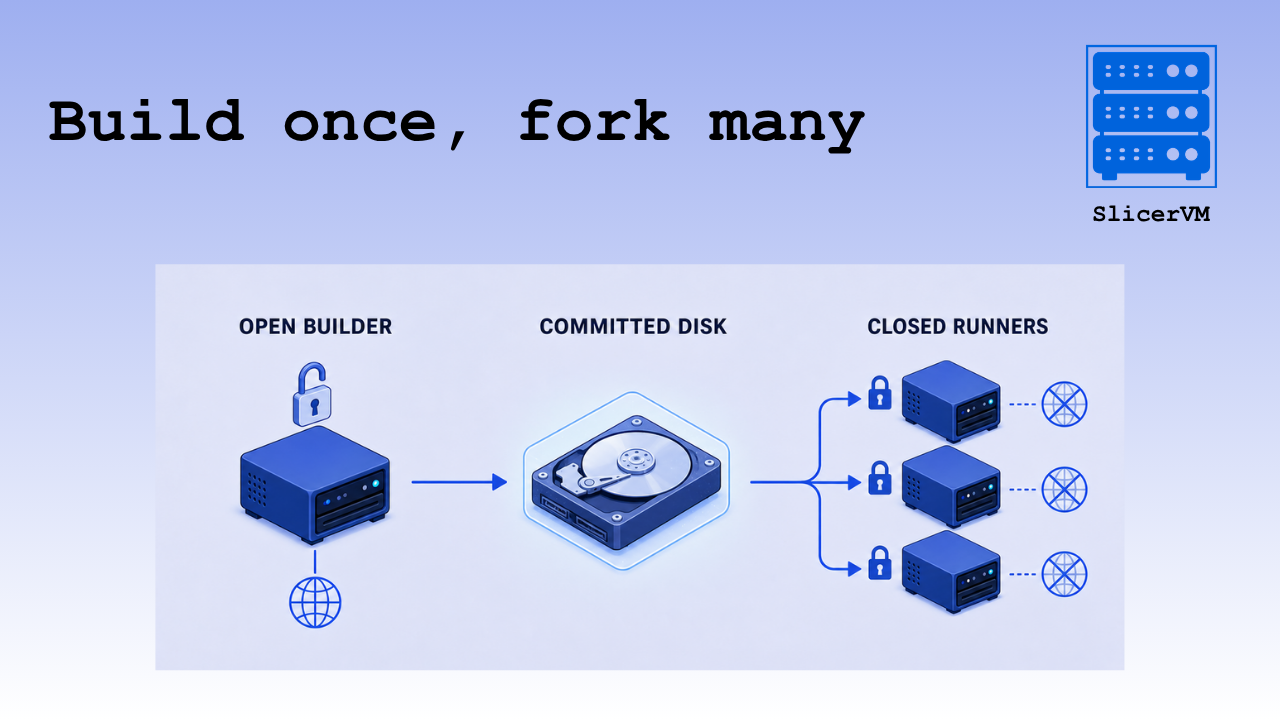
Pictured: An open builder prepares a reusable disk, which is then forked into three closed runners.
Agent sandboxes
Agent sandboxes are an obvious fit. Install the agent, compilers, linters, browsers, and other tools in the builder, then fork a clean runner for each task. Do that before untrusted code or sensitive data enters the VM, and don't put reusable credentials into the builder because every fork would inherit them.
Some examples:
- Coding agents: Fork one coding agent per repository, pull request, or task.
- Production debugging: Reproduce the bug in an open builder using non-confidential logs, then fork it, copy in the confidential logs or dataset, and test with no egress or access only to a local model.
- Web scraping/automation: Prepare Chromium, Playwright, and a database once, then fork one runner per test shard.
- Confidential customer support: Prepare a support environment, copy customer data into a closed runner, run a local model, then delete the VM.
- Comparative testing: Fork the same baseline several times, change one variable in each, and compare how they behave.
- Sample analysis: Download analysis tools into the builder, then inspect each sample in a fresh runner which cannot phone home.
Our code review bot uses an adjacent pattern: it prepares the repository on the host, copies it into a fresh isolated VM, and only permits inference through Slicer Proxy. GitHub and inference credentials stay outside the guest.
Cold forking or a custom image?
You can still build a custom Slicer image with a Dockerfile and buildx. That's the right fit for a generic, stable base image which you're happy to maintain and publish from your own CI pipeline, or when it needs to be shared across several hosts.
For example, arkade is already included in the Slicer image, so an image with Go pre-installed can be this short:
FROM ghcr.io/openfaasltd/slicer-systemd:6.1.90-x86_64-latest

RUN arkade system install go
You'd then build it, push it to a registry, reference it in slicer.yaml, and let each Slicer host pull and unpack it.
For an opinionated agent sandbox product built on Slicer, a custom image may be part of the product itself.
A custom image also has to be built, pushed, pulled, and unpacked. Cold forking is a leaner, more dynamic loop: boot a VM, set it up interactively, commit it, and fork it locally. There's no Dockerfile or registry in the middle.
Try out a real-life example
We'll install Go and build arkade, an open source project similar to Homebrew, but focused on binary releases, then commit the builder and fork a runner with no egress. After changing one line, the rebuild reuses the toolchain, source, dependencies, and Go build cache.
+--------------------- builder: open --------------------+
| install Go -> clone arkade -> build (fill Go cache)    |
+--------------------------+-----------------------------+
                           |
                    shutdown + commit
                           |
                           v
                    +-------------+
                    |  commit ID  |
                    +------+------+
                           |
                    fork with DROP
                           |
                           v
+-------------------- new runner: closed ----------------+
| change one Go line -> rebuild from inherited cache     |
+--------------------------------------------------------+
Pictured: Build arkade in the open VM, commit it, then change one line and rebuild in a closed fork.
If you're upgrading an existing Slicer host, refresh the CLI and local images first. The guest agent changed for this release, so run the example in a fresh directory:
sudo slicer update
sudo slicer image wipe
mkdir -p cold-fork-demo
cd cold-fork-demo
Generate a host group with no pets, the fast-booting min image, image storage, and isolated networking:
slicer new runners \
  --count 0 \
  --min \
  --storage image \
  --net isolated \
  > slicer.yaml
The generated group allows egress, so the builder can download what it needs.
Run Slicer in one terminal:
sudo -E slicer up slicer.yamlThen launch a persistent builder from another:
BUILDER=$(slicer vm add runners \
  --persistent \
  --tag role=builder \
  --wait \
  --timeout 10m \
  --json | jq -r '.hostname')

echo "$BUILDER"
The response gives us the allocated hostname. arkade is pre-installed in the min image, so use it to install Go, clone arkade, and build it:
slicer vm exec "$BUILDER" -- \
  "sudo arkade system install go"

slicer vm exec "$BUILDER" -- \
  "git clone https://github.com/alexellis/arkade \
     /home/ubuntu/arkade && \
   cd /home/ubuntu/arkade && \
   /usr/local/go/bin/go build -mod=vendor -o ./arkade"
Shut down the builder, then commit its disk:
slicer vm shutdown "$BUILDER"

KEY=arkade-go-v1
COMMIT=$(slicer vm commit "$BUILDER" \
  --cache-key "$KEY" \
  --json | jq -r '.commit_id')
Now fork a runner, clear any inherited allow list, and drop everything else. Slicer allocates the next free hostname, which we capture for the later commands:
RUNNER=$(slicer vm fork "$COMMIT" \
  --wait \
  --tag role=runner \
  --no-allow \
  --drop 0.0.0.0/0 \
  --json | jq -r '.hostname')
The DROP is applied outside the guest. Root inside the runner cannot flush it with iptables -F, unset a proxy variable, or simply decide it doesn't like the policy.
Forking from a commit works with both bridge and isolated networking. The --allow, --no-allow, and --drop firewall flags only work with isolated networking, which is why we're using it here.
The command returns after the guest agent has given the child its own hostname, machine ID, and network identity. It has Go, the arkade source, and the build cache, but no egress.
Change one line, then build it again:
slicer vm exec "$RUNNER" -- \
  "cd /home/ubuntu/arkade && \
   sed -i \
     's/boot Linux microVMs instantly/boot Linux microVMs quickly/' \
     pkg/thanks.go && \
   /usr/local/go/bin/go build -mod=vendor -o ./arkade"
The first build filled Go's build cache. The fork inherits the compiler, source tree, vendored dependencies, and that cache, so the second build only recompiles what changed.
Then throw the runner away:
slicer vm delete "$RUNNER"The committed disk remains ready for the next fork.
Cache the whole builder step
This is similar to Docker's build cache, but at a coarser level. Slicer doesn't cache individual layers; the cache key points to the complete committed builder disk.
The next time the workflow runs, look up the key first:
KEY=arkade-go-v1
COMMIT=$(slicer vm commit list \
  --cache-key "$KEY" \
  --json | jq -r '.[0].commit_id // empty')
If COMMIT is present, skip launching the builder, installing Go, cloning the repository, and building arkade. Go straight to slicer vm fork. The caller owns the key, so change it whenever the setup inputs change.
This means the same shell workflow can be run again without paying the setup cost again.
Drive it through the Go SDK
For an API-driven platform, look up the cache key with ListCommits(). If it exists, take its commit ID and fork it:
commits, err := client.ListCommits(ctx, slicer.SlicerCommitListOptions{
	CacheKey: "arkade-go-v1",
})
if err != nil || len(commits) == 0 {
	log.Fatal("prepare and commit the builder")
}

commitID := commits[0].CommitID
emptyAllow := []string{}
dropAll := []string{"0.0.0.0/0"}

runner, err := client.ForkCommittedVM(ctx, commitID,
	slicer.WithTags("role=runner"),
	slicer.WithNetwork(&slicer.SlicerForkVMNetworkPolicy{
		Allow: &emptyAllow,
		Drop:  &dropAll,
	}),
)
if err != nil {
	log.Fatal(err)
}

fmt.Println(runner.Hostname)
On a cache miss, prepare and commit the builder as before. See the complete cold forking example for committing a builder, looking up cache keys, inspecting the runner, and cleaning everything up.
The same workflow is available through GET /vm/commits?cache_key=... in the REST API, and client.commits.list() in the TypeScript SDK.
What about hot forking?
With cold forking, each child starts from disk state committed from a stopped VM. It doesn't inherit processes, open sockets, or whatever happened to be in RAM at the time.
Hot forking would capture the running VM's memory and device state too. Its children would resume from that point instead of booting from disk.
We're working on hot forking next. Today, persistent Firecracker VMs in Slicer, and VMs in Slicer for Mac, can already be suspended and restored:
slicer vm suspend "$VM"
slicer vm restore "$VM" --wait agent
Suspend and restore are also available through the REST API, Go SDK, and TypeScript SDK. What you can't do yet is fork several children from that suspended state.
First, we want feedback on the API and lifecycle from the initial users in Discord who asked us for cold forking.
Try cold forking
Cold forking is available now in Slicer for Firecracker with image, devmapper, and zvol storage.
The Open Builder/Closed Runner pattern (similar to Codex Cloud) is not the only way to use cold forking. You can fork a stopped, persistent VM whether its host group uses bridge or isolated networking. With isolated networking, a child can be given no network egress, a short allow list, or sent through Slicer Proxy where policy can be narrowed by host, URL path, HTTP method, and TTL.
You can also start a fresh VM with restricted egress from its first boot, and keep the setup and credentials on the host. Or prepare a batch worker with a C toolchain, native Python modules, NumPy, or a machine learning toolkit, then fork one clean worker per job.
If you want to continue the same VM later, suspend and restore it. If you want several clean VMs from the same disk state, commit and fork it. Both workflows can be driven through the CLI, REST API, Go SDK, or TypeScript SDK.
If you already have Slicer, run sudo slicer update, sudo slicer image wipe, and remove any .lock files from existing projects. Then pick a setup you repeat often, commit it, and fork it.
If Slicer is new to you, explore the documentation, try Slicer for Mac, or start a free trial. If you find a rough edge, tell us in Discord.
Build once, fork many.