Stop driving Slicer by hand - give your agent the wheel
Driving Slicer by hand is like using LLMs for tab completion. Let your agent automate the workflow end to end.
Can you remember the excitement of tab completion powered by an LLM - directly in your IDE? Local Linux VMs followed the same pattern: tools like Orbstack, Lima, and UTM give you a nice UI, but you're still clicking, editing config, and SSH-ing in by hand.
Slicer gives you Linux microVMs, with systemd, a dedicated kernel, and full OS, that boot in under a second. You can drive it by hand with the CLI, or you can hand the work off to your AI agent and just say:
Test our changes on my mini PC at 192.168.0.2.
Install K3s, deploy the local version of the Helm chart, and
add the remote cluster to my local kubeconfig so I can use
kubectl.

Test that kubectl is working, and that the application started
properly, without errors - before you hand it back.
The Slicer agent skills teach your agent how to launch, manage, and work with Slicer VMs so prompts like that actually work end to end.
In this article we'll walk through a number of practical examples that show what the slicer agent skills can do. We used OpenCode to run the examples, but the same skills work with any agent that supports the Agent Skills standard, like Claude Code or Codex.
- Run a temporary Docker daemon
- Test a systemd service end to end on your Mac
- Build and test an ArgoCD Application for your new microservice
- Spin up an agent with its own worktree
- Set up an Arm Docker Builder on a Raspberry Pi
- Clone a private repo through Slicer Proxy without a credential
Agent Skills - the secret sauce
The core use-slicer skill covers everything from daemon connection to VM creation, command execution, file transfer, port forwarding, and agent sandboxes. Additional companion skills extend the capabilities further:
- use-k3sup — provision single-node or HA k3s clusters with k3sup
- use-slicer-worktrees — push git worktrees into VMs, let agents commit, pull changes back
- use-slicer-proxy — filter egress, audit traffic, and inject secrets into VM HTTP requests
Combining these skills lets your agent run end-to-end workflows.
1. Run a temporary Docker daemon
You want a clean Docker setup that does not pollute your host and can be thrown away anytime. Launch a Slicer VM to run the Docker daemon and port-forward its socket, so the local Docker CLI works just like it would against a local daemon.
The prompt you could give to your agent:
Setup docker on slicer and show me the command to forward
the docker socket for local use.
The agent loads the use-slicer skill to discover if a Slicer instance is running, launches a new VM, and uses the slicer vm exec command to install Docker on the VM.
At the end it prints out the commands to forward the Docker socket to your local host. Additionally, the agent gives a couple of Docker command examples that can be run against the forwarded socket.
slicer vm forward sbox-1 -L /tmp/docker.sock:/var/run/docker.sock &
export DOCKER_HOST=unix:///tmp/docker.sock
After starting the port forward, docker ps, docker run, and any other Docker command behave as usual. Every container runs inside the slicer VM, leaving your host untouched:
$ docker run -d --name demo alpine sleep 300
$ docker ps
CONTAINER ID   IMAGE     COMMAND       STATUS         NAMES
5580e8ace925   alpine    "sleep 300"   Up 1 second    demo
2. Test a systemd service end to end on your Mac
Say you're on a Mac and want to test a systemd unit file against real Linux, not a container shim or cloud VM you have to request. A sandbox Slicer VM gives you a real kernel with systemd in under a second.
Here's a prompt you could give to your agent:
Create a sandbox VM and test the Caddy systemd service file.

Install Caddy via the official script, copy the unit file from
https://raw.githubusercontent.com/caddyserver/dist/master/init/caddy.service
to /etc/systemd/system/caddy.service, and write a Caddyfile at
/etc/caddy/Caddyfile serving "Hello from Slicer" on :80.

Enable and start the service, verify with systemctl status caddy,
port-forward 8080 from the VM to my localhost and curl it,
then test systemctl reload caddy.

Summarize the test results and any issues, did the service file work
as-is, were there problems with permissions, capabilities, or the
Type=notify behavior?
The agent chains a handful of Slicer commands end-to-end: slicer vm add to create the VM, slicer vm exec to install Caddy and write the unit file inside the VM, and slicer vm forward to map a VM port to your localhost. It then runs the test as instructed and reports back with the summary you asked for.
3. Build and test an ArgoCD Application for your new microservice
Your team has created an application and wants to deploy it to Kubernetes using ArgoCD for continuous delivery. By spinning up a temporary Kubernetes cluster in a Slicer VM and running ArgoCD on it, the agent can test the ArgoCD application while building it.
A prompt for your agent might look like this. In this example we ask it to deploy the commonly used guestbook example app:
Create an ArgoCD application to sync the app at:
https://github.com/kubernetes/website/tree/main/content/en/examples/application/guestbook

Install ArgoCD and test the app in a temporary Kubernetes cluster
deployed with Slicer.
The agent combines two skills here, splitting the work between them:
use-slicerdrives the VM lifecycle:slicer vm addto spin up the VM,slicer vm execto run commands inside it.use-k3suphandles the cluster bootstrap, installing k3s.
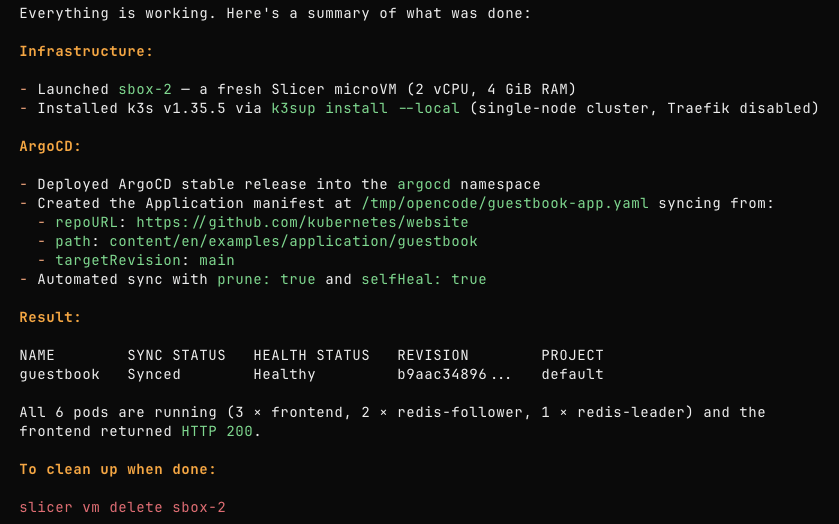
After setting up the Kubernetes cluster on a fresh VM, the agent deployed ArgoCD, created the Application manifest, and waited for the guestbook app to reach a Synced / Healthy state before reporting back.
Here is what the agent reported back after completing the task:
4. Spin up an agent with its own worktree
Say you want to let a coding agent work on a feature branch, but you don't want it running on your host: no toolchains or dependencies installed on your machine, no access to your credentials or SSH keys.
The host agent can act as an orchestrator. It creates a Git worktree for a feature branch, pushes it into a fresh Slicer VM, and hands the actual coding off to a nested OpenCode instance running inside the sandbox. Slicer worktrees sync any commits the inner agent makes back into your repo as ordinary commits on the feature branch.
Here's a prompt you could give to your agent:
Act as an orchestrator. Create a git worktree for a new branch
feature/hello-http-handler and push it into a fresh Slicer VM.

Inside the VM, run OpenCode non-interactively with full permissions
to implement the following: analyze the codebase, add a hello world
HTTP handler, run the tests until they pass, and commit the changes.

Once the nested agent finishes, pull the commits back to the host
and show the git log.
The agent combines two skills here, splitting the work between them:
use-slicerprovisions the sandbox:slicer vm addto create the VM,slicer opencodeto install OpenCode inside it, andslicer vm bg execto run the nested agent non-interactively in the background.use-slicer-worktreeshandles the code:slicer wt pushstages a sanitised worktree inside the VM, andslicer wt pullfast-forwards your host branch with whatever the nested agent committed.
When the nested OpenCode finishes, the orchestrator pulls the commits back. The branch on your host now contains the new commits as if they had been written locally, except none of the work, dependencies, or failed test runs ever touched your machine.
The repo used in this example starts with a basic server and a failing /hello test. After slicer wt pull, the agent's commit appears on the feature branch alongside the pre-existing ones:
$ git -C feature/hello-http-handler log --oneline
f7e3781 Add /hello HTTP handler that returns Hello, World!  # added by agent
6e741f1 Add failing test for /hello handler                  # pre-existing
09a9624 Initial commit: basic HTTP server                    # pre-existing
5. Set up an Arm Docker Builder on a Raspberry Pi
If you are building multi-arch container images, building arm64 images locally through QEMU can be slow and unreliable. Instead, if you have a Raspberry Pi running Slicer or Apple Silicon Mac running Slicer for Mac, you can spin up a VM there and register it as a remote BuildKit builder.
Here's a prompt you could give to your agent:
Set up a remote arm64 buildkit instance in a Slicer VM on http://of1.local:8080.
Register it with buildx on this host using Unix socket forwarding.
Do a test to verify the builder can be used for arm64 container builds.
Using the use-slicer skill, the agent connects to the Slicer instance on the specified URL, spins up a new VM with slicer vm add, and verifies it is running arm64 with uname -m. It then installs and starts buildkitd inside the VM, forwards the Unix socket to the host with slicer vm forward, and registers the remote builder with docker buildx create --driver remote before running a test build targeting linux/arm64.
Once the agent finishes, you have a persistent arm64 builder registered with buildx. Forward the socket and your docker buildx workflows run natively on arm:
slicer vm forward sbox-1 -L /tmp/buildkitd-arm64.sock:/run/buildkit/buildkitd.sock &$ docker buildx ls
NAME/NODE DRIVER/ENDPOINT STATUS PLATFORMS
arm64-slicer remote running linux/arm64Any docker buildx build --platform linux/arm64 command now routes through the VM on your Raspberry Pi, Apple Silicon Mac, or other arm64 host, instead of emulating through QEMU.
6. Clone a private repo through Slicer Proxy without a credential
In the worktree example, the nested agent inside the VM had access to credentials stored inside the VM. If you want to lock that down, injecting only the credentials needed inside the VM without leaking them to the agent, that is what the Slicer Proxy is for.
A simple example using the Slicer Proxy is cloning a private repo, where a fine-grained GitHub access token is injected by the host proxy and never passed into the VM.
Here's a prompt you could give to your agent:
Launch a new isolated Slicer VM and clone github.com/myorg/api-service inside it.
Safely inject the GitHub access token found at ~/secrets/gh-access-token so it
is never exposed inside the VM.
The agent combines two skills here, splitting the work between them:
use-slicerlaunches the isolated VM withslicer vm addand runs the clone inside it withslicer vm exec.use-slicer-proxysets up the proxy policy:slicer proxy client createto register a scoped client,slicer proxy secret createto store the token on the host, andslicer proxy allowto grant the client access togithub.comwith the secret injected.
The proxy rules confirm what the VM is allowed to reach:
$ slicer proxy rules clone-agent
HOST             SECRET        MODE    METHODS   PORTS     PATHS     EXPIRES
github.com       gh-token      mitm    any       80,443    any       never
The clone runs inside the VM with HTTPS_PROXY pointing at the host proxy. The proxy injects the Authorization header into matching requests and forwards them to GitHub. The VM itself never sees the credential at any point.
Wrapping up
We started off with a premise that agents can drive Slicer quicker and more effectively than we can by hand. The six examples showed this isn't just demoware - a range of development, and deployment tasks were automated without us having to read docs pages or run installation scripts ourselves.
Skills are a condensed knowledge base, so they will have gaps, and we think that's OK. The models available in 2026 have deep reasoning capabilities, and even a smaller model like Qwen 3.6 27B is quite capable of running --help or scanning available files to get more context to complete a task.
Our docs contain many more examples of use-cases and services you can run with Slicer, each written out as step-by-step instructions you can follow yourself or hand to your agent as additional guidance alongside the Slicer agent skills.
To get started yourself, install the Slicer agent skills and pick one of the examples above as your first prompt. The skills work with any agent that supports the Agent Skills standard, including OpenCode, Claude Code, and Codex.