Slicer for Mac: Preview
A WSL-like Linux VM for Mac that boots in half a second, with native folder sharing, Docker, K3s, and disposable sandboxes for AI agents.
In this post we'll explore what Slicer looks like as a native macOS port, where instead of Linux networking, and KVM/Firecracker, we use Apple's own native Virtualization framework.
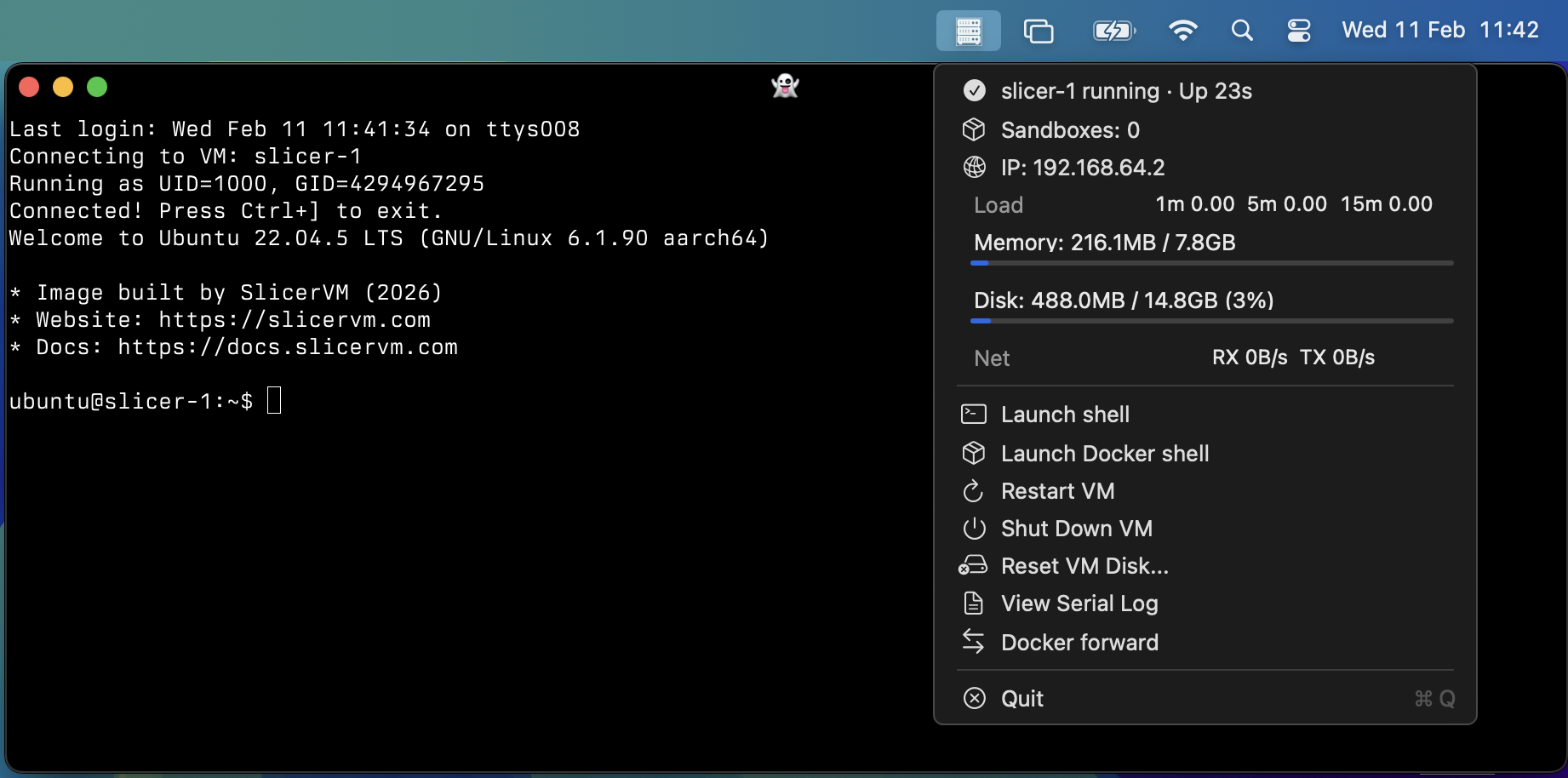
Slicer's native tray application, a Linux VM with your home folder mounted from the host.
The initial response both on X and LinkedIn has been really positive, users are asking to get access.
A developer in India signed up this morning, entered the Discord and at 07:47 said "I'm about to try it".. literally 5 minutes later, his next message was: "Works seamlessly!".
That's what we're about. That's what we're building with Slicer, and now it's coming to Mac.
Slicer for the uninitiated
At OpenFaaS Ltd, we've been running Slicer on Linux since 2022 as an internal tool for development and testing, and for partitioning up bare-metal servers for our public-facing workloads and APIs.
One of our earliest use-cases was rapid deployment of Kubernetes clusters to reproduce customer issues and to test new features. Rather than launching an EKS cluster, paying goodness knows what and waiting 30-35 minutes for some basic feedback, we made that happen in low single-digit minutes.
From the beginning we knew we wanted a tool that was:
- CLI driven
- API-first
- SDK friendly with an OpenAPI spec
- more developer-friendly than: Multipass, QEMU, VirtualBox, Proxmox, OpenStack, and ESXi
And most of all, it had to boot as fast as possible, and be able to tear down just as quickly.
Slicer for Mac
Slicer for Mac is our native port for macOS users, who are running Apple Silicon Macs, whether that's your laptop or a device plugged into a wall socket.
Since Linux and VMs in general we positioned Slicer around two use-cases: Slicer Services, and Slicer Sandboxes.
Our goals were similar to Slicer on Linux, but with a more opinionated approach:
Slicer Services
Services are VMs defined in YAML, which are permanent, persistent, and predictable.
Consider the "slicer" hostgroup and its first VM as your Linux twin.
- Native Linux responsiveness and feel on mac
- No complex GUI wrappers, sorry that's just not what we're going after here
- Not specifically a "Docker for Mac" replacement (but will do it anyway)
Pain we're trying to solve with Slicer Services:
- You're more at home with Linux than macOS, but you have a company issued machine
- You need a Kubernetes cluster to test your work - but you'll be waiting days for that ServiceNow ticket to get approved
- You are working with eBPF programs and need a real, Linux kernel to build and run them on.
- You find the various OSS/free tools give less than ideal customer support (read: they're projects, not products)
- What you've tried feels heavy, slow, cumbersome, targeted at click-ops, but you're DevOps, you're IaaC, you say things like "but where is the API?"
Slicer Sandboxes
Slicer Sandboxes are VMs that launch in ~ 0.5s and are completely ephemeral and disposable.
Here's how we'd see you using them:
- Coding agents like Claude Code, but with
--dangerously-skip-permissions. - You're developing a product for Linux cloud VMs, not for Macs, so you get a full local Linux VM instantly.
- Maybe you actually want 2-3 K3s clusters, and to deploy different versions of your work, to validate different approaches
Jason Poley, Head of Engineering at Macquarie Group, wrote about The Sandbox Explosion - how Docker, Apple, AWS, Azure, and Google have all moved to microVM-based sandboxes because containers were never the right security boundary.
AI Native workflows - "no, you test it"
Here's how we use AI agents to help build and extend our products:
Implement feature X, once complete, use AGENTS.md to boot up a Slicer VM and test it end to end.
That one extra step, closes the loop. We often see the agent take a first pass and say "Oh it didn't work, let me look at why. Oh OK, yeah we need to do X, Y, Z." and by the time the terminal chimes, it's done, tested and we have proven console output.
We took our existing Kernel for Linux, and tweaked it to work on mac. We took exactly the same approach, telling the agent to SSH into my mac and test e2e, until it worked.
This enables us to iterate incredibly rapidly with a commodity coding plan from Anthropic, OpenAI, or GitHub Copilot for instance.
Conceptual diagram: Slicer Services
Slicer runs a highly tuned Ubuntu LTS guest, with optional directory sharing using VirtioFS, Rosetta (for running x86_64 Linux binaries).
We think of this as the Linux twin for your mac - its more unhinged alter-ego.
One that can you can test your real work with, since the status quo is to run production on Linux VMs in the cloud. Why struggle with just POSIX compatibility?
┌────────────────────────────────────────────────────────────┐
│  macOS Host                                                │
│                                                            │
│  ~/.slicer/docker.sock  ◄───┐                              │
│  localhost:6443  ◄──────┐   │                              │
│  ~/  ◄── VirtioFS ──┐   │   │                              │
│                     │   │   │                              │
│  ┌──────────────────┼───┼───┼───────────────────────────┐  │
│  │  slicer-1        ▼   │   │  (persistent)             │  │
│  │  4 vCPU, 8GB RAM     │   │                           │  │
│  │  /home/ubuntu/host/  │   │                           │  │
│  │  Docker ─────────────┼───┘                           │  │
│  │  K3s :6443 ──────────┘                               │  │
│  │  opencode, claude, etc                               │  │
│  └──────────────────────────────────────────────────────┘  │
│                                                            │
│  ┌──────────────────────────────────────────────────────┐  │
│  │  slicer-mac daemon (Apple Virtualization)            │  │
│  │  slicer.sock                                         │  │
│  └──────────────────────────────────────────────────────┘  │
└────────────────────────────────────────────────────────────┘
The above diagram shows a single VM running in the "slicer" host group. We've forwarded a UNIX socket for Docker, TCP port 6443 for Kubernetes, and we've installed an AI agent.
slicer-macis the daemon that runs a Slicer-compatible server on Apple Virtualization. The main thing you'll do with this is runslicer-mac up, and best of all it doesn't need root privileges.sliceron Linux is a full daemon and API client, but on Windows and macOS, it's just a client that has all theslicer vmcommands.
Conceptual diagram: Programmable Linux
The second host group that ships with the config is named sbox.
Any VMs you launch here are ephemeral, meaning they will be destroyed when you exit slicer-mac or shut down the VM.
These are ideal for short-lived tasks that don't need to persist beyond the current session, and for rapid e2e testing.
┌───────────────────────────────────────────────────────────┐
│                        macOS Host                         │
│                                                           │
│  ┌──────────────────────────┐ ┌──────────────────────────┐│
│  │  sbox-1 (ephemeral)      │ │  sbox-2 (ephemeral)      ││
│  │  2 vCPU, 4GB RAM         │ │  2 vCPU, 4GB RAM         ││
│  │                          │ │                          ││
│  │  opencode + git repo     │ │  Docker build + test     ││
│  │  ────────────────────    │ │  ────────────────────    ││
│  │  Copy repo in, run agent,│ │  Copy Dockerfile in,     ││
│  │  copy results out        │ │  build, run tests        ││
│  └──────────────────────────┘ └──────────────────────────┘│
│                                                           │
│  ┌──────────────────────────────────────────────────────┐ │
│  │  slicer-mac daemon (Apple Virtualization)            │ │
│  │  slicer.sock (Unix socket API)                       │ │
│  └──────────────────────────────────────────────────────┘ │
└───────────────────────────────────────────────────────────┘
How to get started
There are plenty of videos, and use-cases in the Slicer documentation for Linux. So if you're just wanting to dig a bit deeper, you can learn more there.
If this sounds like something you want to try right now. Then folliow this section.
Sign up for Slicer Individual or higher.
Generally, these commands can all be run without sudo, it's just there so you don't have to move the binary yourself into your $PATH.
Install the Slicer CLI (as a client):
curl -sLS https://get.slicervm.com | sudo bashDownload the Slicer for Mac binary:
slicer install slicer-mac ~/slicer-macYou'll see "slicer-mac.yaml" - leave it mainly as it is. This file can be regenerated via slicer-mac new at any time.
Start slicer-mac:
~/slicer-mac/slicer-mac upThen you are ready to connect via slicer and get a shell:
export SLICER_URL=~/slicer-mac/slicer.sock

slicer vm --token "" shell slicer-1
Passwordless sudo is built-in, or you can pass --uid 0 to run as root.
The slicer vm --help command will show the various operations our deeply integrated agent can offer: list, shutdown, pause, resume, add, remove, cp, forward, exec, shell, logs, etc.
Wrapping up
It's never easy to write up something as powerful and versatile as "native-speed Linux twin/sandboxes" for macOS, but I hope you've got the gist of what we're trying to build here. And how it's different from existing solutions like Docker Desktop, UTM, QEMU, and the alike.
- Slicer has no tech debt, no baggage. It's not replacing a GUI wrapper for Docker, it's not for click-ops folks.
- Slicer is opinionated, programmatic Linux that boots almost instantly, and uses very few resources.
- Has an engaged Discord community, with direct help from the engineering team.
It solves for:
- Your IT team frustrates your daily workflow: Linux and Kubernetes are not 0.5s seconds away, they're hours, days away.
- Your manager has no budget of his own, certainly not for cloud resources.
- You're high agency and independent, want to get stuff done now. Realise POSIX-compatibility is not the same as Linux for end-to-end testing.
- You are rightly annoyed with approving every permission for opencode, amp, claude code, codex, copilot, etc. You are so tempted to run
--dangerously-skip-permissionsto get things done faster. Maybe you already are.
Slicer for Mac is in preview, it's working and capable of what we've covered above.
Discord is currently the best place to participate in the preview, where you can ask questions, share direct feedback, and engage with our developers.
We've also launched initial docs for Slicer for Mac and will be updated it based upon feedback you share with us.
See also: